Building Workflows in StreamSpace Studio
Learn how to design and build automated workflows using the visual workflow builder and node library.
Overview
The StreamSpace Studio Workflow Builder provides a visual, drag-and-drop interface for creating sophisticated automation workflows. Combine AI capabilities, integrations, logic nodes, and data processing tools to build powerful automated processes.
What You Can Build:
- Customer service chatbots with intelligent routing
- Document processing and data extraction workflows
- Multi-channel communication automation
- Integration workflows connecting multiple systems
- Complex business logic with conditional routing
- AI-powered analysis and decision-making processes
Workflow Builder Interface
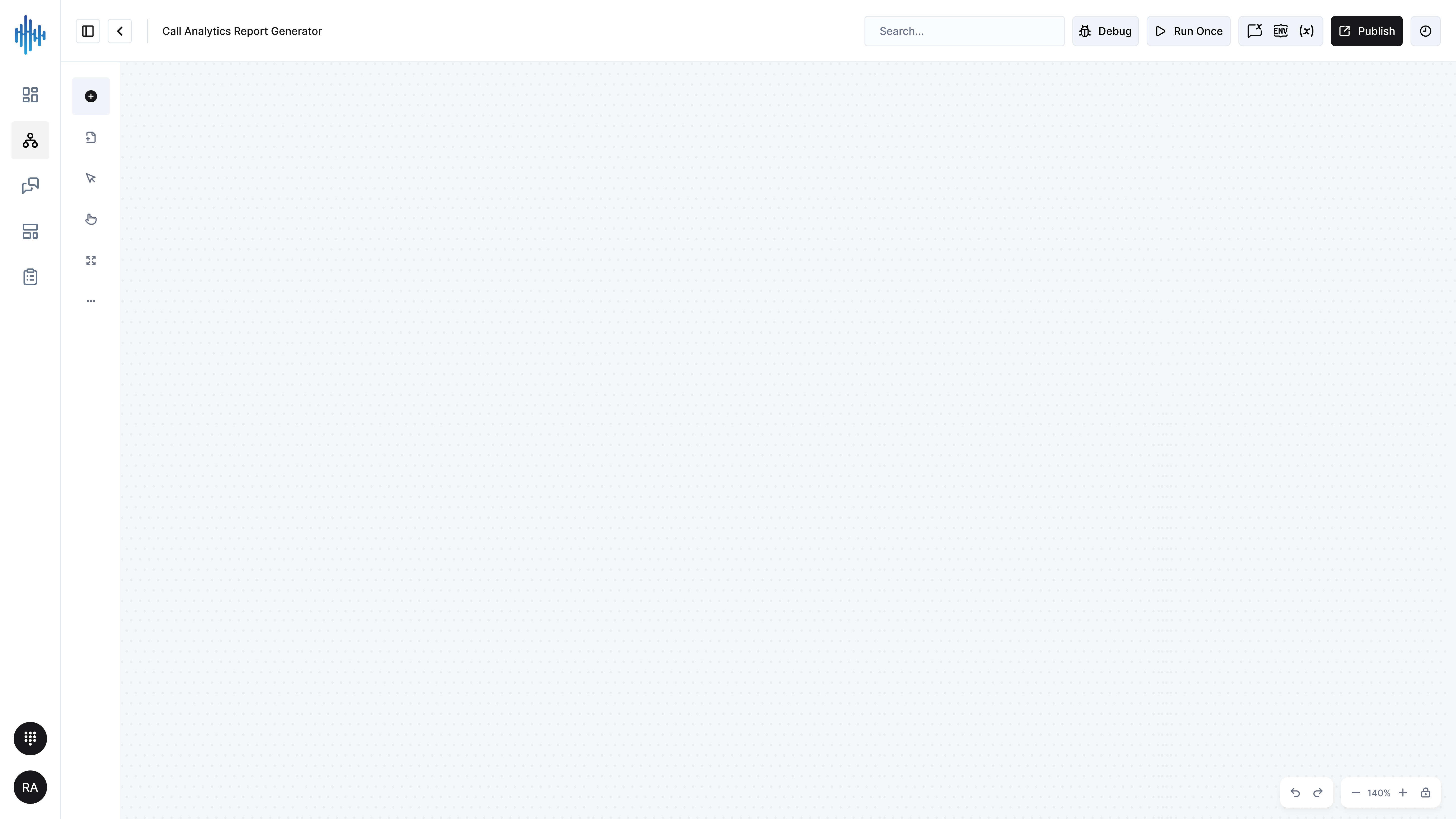
When you open a workflow for editing, you'll see the visual workflow builder with these key components:
Canvas Area
The main white canvas is your workspace for designing workflows.
Features:
- Drag and Drop: Add nodes from the library and position them on the canvas
- Visual Connections: Draw lines between nodes to define execution flow
- Zoom Controls: Bottom-right corner (zoom in/out, fit to screen)
- Pan and Navigate: Click and drag the canvas to move around
- Grid Snap: Nodes align to an invisible grid for clean layouts
The START Node:
Every workflow begins with a START node that appears automatically. This is the entry point where workflow execution begins.
Top Toolbar
Located at the top of the screen, the toolbar provides workflow controls:
Left Side:
- Back Arrow: Return to the workflow list
- Workflow Name: "Test Flow" (click to rename)
Right Side:
- Run Once: Execute the workflow immediately for testing
- Additional Controls: Settings, variables, and execution options
- Publish Button: Deploy the workflow to production
- Undo/Redo: Step backward or forward through changes
Left Sidebar Tools
The vertical toolbar on the left provides quick access to:
- Add Node (+): Open the node library to add new nodes
- Selection Tool (Arrow): Select and move nodes on the canvas
- Hand Tool: Pan around the canvas
- Zoom Tool: Zoom in and out of the canvas
- More Options (...): Additional canvas settings
Node Library Panel
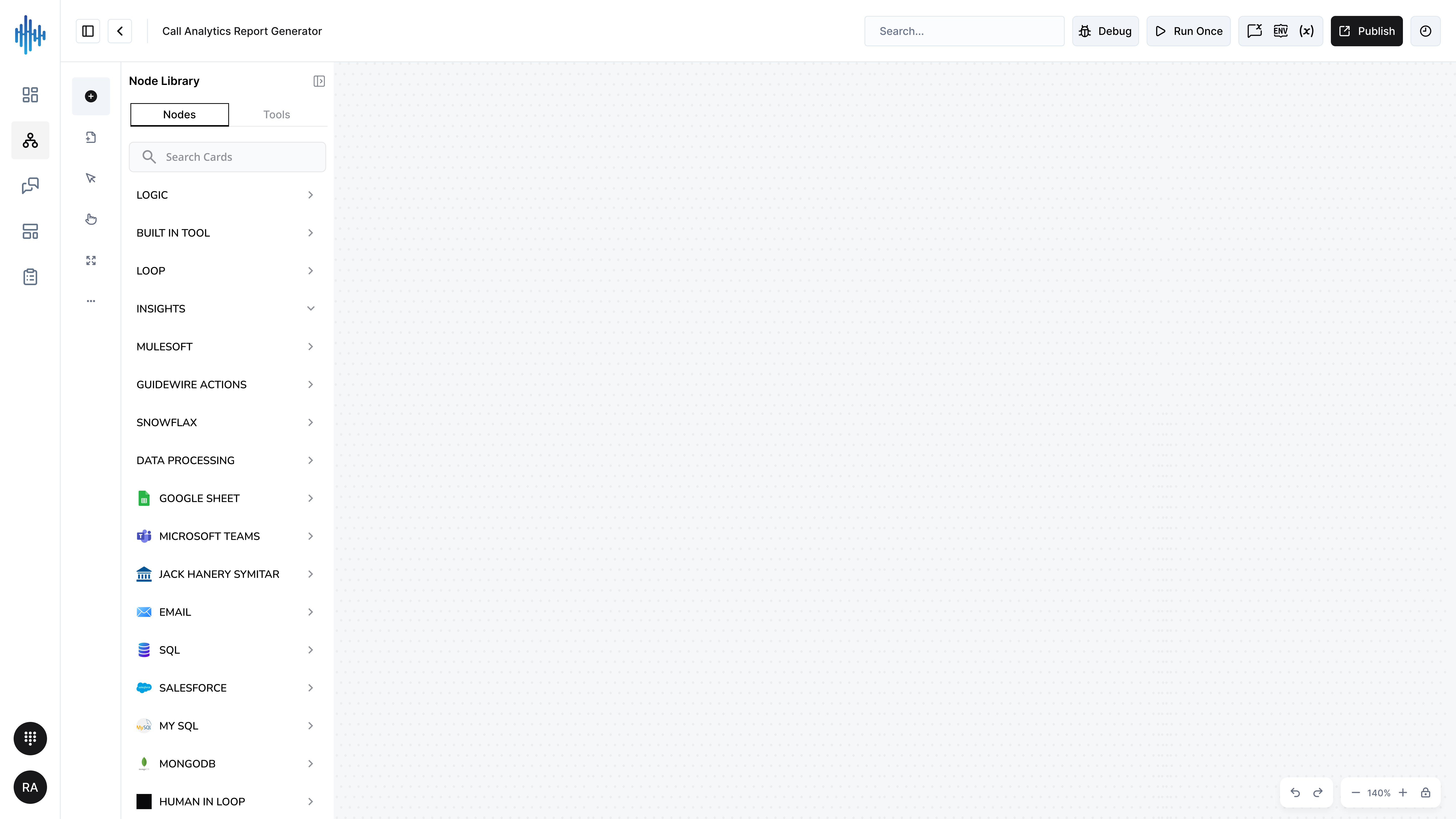
The Node Library is your palette of building blocks for creating workflows. Access it by clicking the Add Node (+) button in the left sidebar.
Nodes Tab
The "Nodes" tab contains StreamSpace Studio's core workflow building blocks organized by category.
Search Functionality:
Use the search bar to quickly find specific nodes by name or function.
Node Categories:
The "Nodes" tab contains StreamSpace Studio's core building blocks organized by function:
- AI CAPABILITIES - Natural language processing, sentiment analysis, intent classification
- CONTACT ACTIONS - Manage customer data and interactions
- ENGAGE & ROUTE - Control conversation flow and routing logic
- SEND MESSAGE - Deliver messages across channels (SMS, email, push, voice)
- COLLECT - Gather and validate user information
- LOGIC - If/then conditions, loops, and decision-making
- BUILT-IN TOOLS - Date/time, string manipulation, calculations
- LOOP - Repeat actions across datasets
- INSIGHTS - Analytics, metrics, and reporting
- MULESOFT - Enterprise integration platform connector
- GUIDEWIRE ACTIONS - Insurance platform integration
- SNOWFLAX - Data warehouse integration
- DATA PROCESSING - Transform, parse, and manipulate data
- Integration Nodes - TEAMS, GMAIL, EXCEL, MICROSOFT, GOOGLE SHEET, and more
Detailed configuration for each node type will be covered in the Node Configuration guides.
Tools Tab - Third-Party Integrations
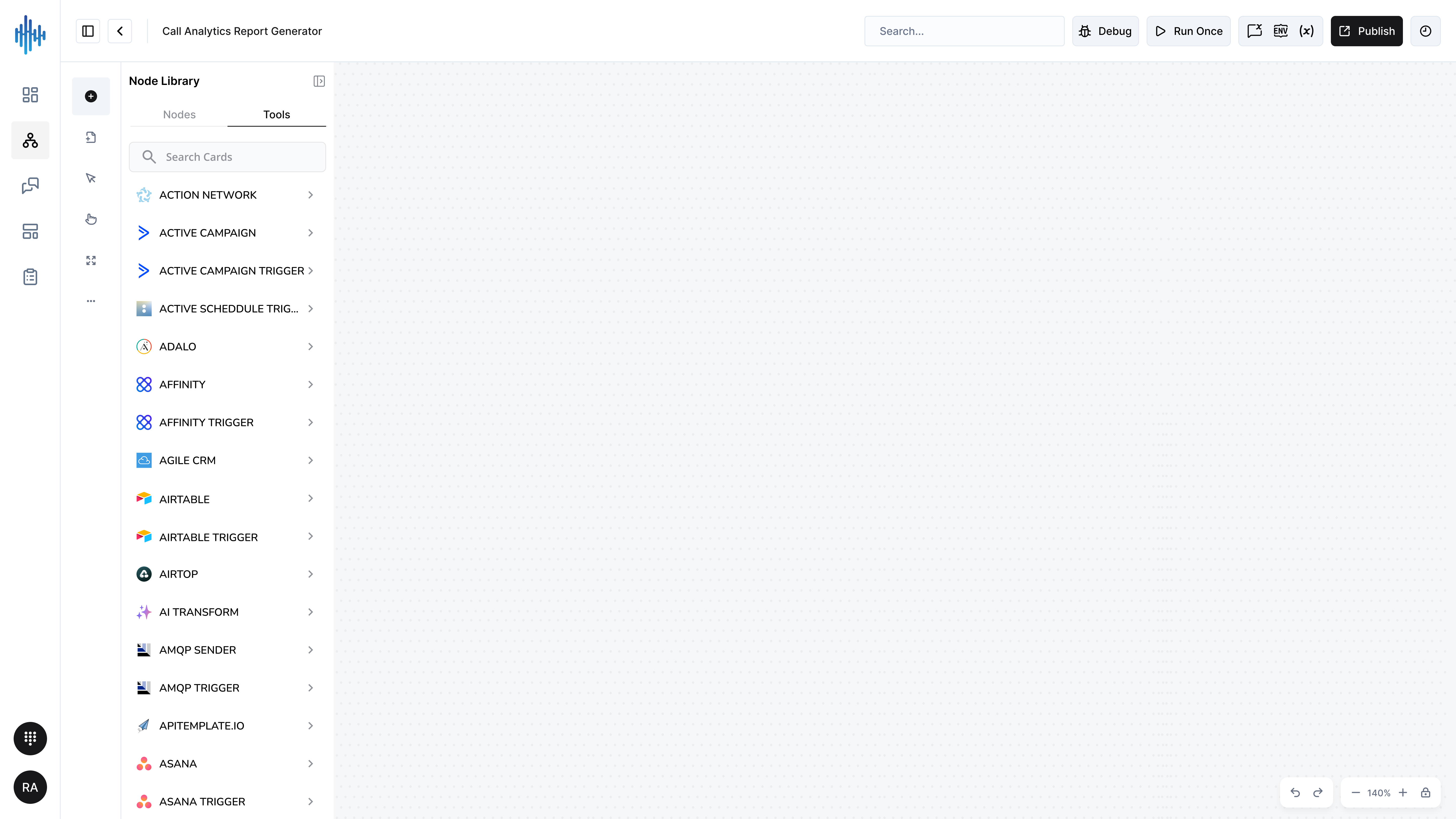
The "Tools" tab provides access to 500+ pre-built integrations with external services and platforms.
Search Functionality:
Use the search bar to find specific tools quickly. Type the service name to filter the list.
Tools Tab - Third-Party Integrations
The "Tools" tab provides access to 500+ pre-built integrations with external services and platforms. These integrations allow you to connect StreamSpace Studio workflows with the tools you already use.
How to Use:
- Click the "Tools" tab in the Node Library
- Use the search bar to find specific services
- Browse alphabetically or scroll through categories
- Click any tool to add it to your workflow
Quick Reference: Popular Tools by Category
💼 Marketing & CRM
| Tool | Use Case |
|---|---|
| HubSpot | Inbound marketing, CRM, and sales automation |
| Salesforce | Enterprise CRM and customer management |
| Mailchimp | Email campaigns and marketing automation |
| ActiveCampaign | Email marketing with advanced automation |
| Pipedrive | Sales pipeline and deal management |
| SendGrid | Transactional and marketing emails |
| Zoho CRM | Complete customer relationship management |
| Customer.io | Behavioral messaging and segmentation |
💬 Communication & Collaboration
| Tool | Use Case |
|---|---|
| Slack | Team messaging and workspace collaboration |
| Microsoft Teams | Enterprise communication and collaboration |
| Twilio | SMS, voice calls, and messaging APIs |
| WhatsApp Business | WhatsApp messaging for businesses |
| Discord | Community chat and voice channels |
| Telegram | Telegram bots and messaging |
| Zoom | Video meetings and webinars |
| Webex | Enterprise video conferencing |
📋 Productivity & Project Management
| Tool | Use Case |
|---|---|
| Asana | Project tasks and team collaboration |
| Monday.com | Visual work management platform |
| ClickUp | All-in-one productivity and tasks |
| Trello | Kanban boards and project tracking |
| Notion | Collaborative workspace and wiki |
| Jira | Agile software development tracking |
| Linear | Issue tracking for product teams |
| Todoist | Personal task and to-do management |
📁 File Storage & Documents
| Tool | Use Case |
|---|---|
| Google Drive | Cloud storage and file sharing |
| Dropbox | File sync and cloud storage |
| Microsoft OneDrive | Cloud storage with Office integration |
| Box | Enterprise content management |
| SharePoint | Document libraries and team sites |
| Google Docs | Collaborative document editing |
| Google Sheets | Cloud spreadsheets and data analysis |
| Excel 365 | Microsoft Excel cloud operations |
🗄️ Data & Databases
| Tool | Use Case |
|---|---|
| MySQL | Popular open-source relational database |
| PostgreSQL | Advanced relational database system |
| MongoDB | Flexible NoSQL document database |
| Airtable | Spreadsheet-database hybrid platform |
| Redis | In-memory data store and cache |
| Google BigQuery | Serverless data warehouse |
| Snowflake | Cloud data platform and analytics |
| Microsoft SQL | Enterprise relational database |
☁️ Cloud Services - Amazon Web Services (AWS)
| Tool | Use Case |
|---|---|
| AWS Lambda | Run code without managing servers |
| AWS S3 | Object storage for files and backups |
| AWS DynamoDB | Managed NoSQL database service |
| AWS SES | Send transactional and bulk emails |
| AWS SNS | Push notifications and pub/sub messaging |
| AWS SQS | Message queuing service |
| AWS Rekognition | Image and video analysis with AI |
| AWS Textract | Extract text from documents |
☁️ Cloud Services - Microsoft Azure
| Tool | Use Case |
|---|---|
| Azure Cosmos DB | Globally distributed NoSQL database |
| Microsoft Entra ID | Identity and access management |
| Microsoft Graph Security | Security insights and threat detection |
| Azure Storage | Scalable cloud storage services |
☁️ Cloud Services - Google Cloud
| Tool | Use Case |
|---|---|
| Google Cloud Storage | Object storage for any data type |
| Cloud Firestore | Flexible NoSQL cloud database |
| Cloud Natural Language | Text analysis and NLP |
| Google Analytics | Website and app analytics |
🛠️ Development & DevOps
| Tool | Use Case |
|---|---|
| GitHub | Code hosting and version control |
| GitLab | Complete DevOps platform |
| Bitbucket | Git repository management |
| Jenkins | Build automation and CI/CD |
| CircleCI | Continuous integration platform |
| Netlify | Web hosting and deployment |
🤖 AI & Machine Learning
| Tool | Use Case |
|---|---|
| Google Gemini | Google's multimodal AI model |
| Mistral AI | Open-weight language models |
| Sentiment Analysis | Detect positive/negative sentiment |
| Information Extractor | Extract structured data from text |
| Text Classifier | Categorize and tag text content |
| Wolfram Alpha | Computational knowledge engine |
💰 Business & Finance
| Tool | Use Case |
|---|---|
| Stripe | Payment processing and subscriptions |
| PayPal | Online payment gateway |
| QuickBooks | Accounting and bookkeeping |
| Xero | Cloud accounting software |
| Shopify | E-commerce platform |
| WooCommerce | WordPress e-commerce plugin |
| Chargebee | Subscription billing management |
🎧 Customer Support
| Tool | Use Case |
|---|---|
| Zendesk | Help desk and customer support |
| Freshdesk | Cloud-based support software |
| Help Scout | Customer service and email support |
| Intercom | Live chat and customer messaging |
| ServiceNow | IT service management platform |
📝 Forms & Surveys
| Tool | Use Case |
|---|---|
| Typeform | Beautiful interactive forms |
| Jotform | Drag-and-drop form builder |
| SurveyMonkey | Survey creation and analysis |
| Google Forms | Simple form and quiz creation |
📱 Social Media
| Tool | Use Case |
|---|---|
| X (Twitter) | Tweet posting and automation |
| Facebook Graph API | Facebook pages and posts |
| Professional networking API | |
| YouTube | Video uploads and management |
⚙️ Utilities & Developer Tools
| Tool | Use Case |
|---|---|
| HTTP Request | Call any REST API |
| Webhook | Receive webhook events |
| Code | Execute custom JavaScript/Python |
| Date & Time | Work with dates and times |
| Filter | Filter and clean data |
| Merge | Combine multiple datasets |
🔐 Security & Authentication
| Tool | Use Case |
|---|---|
| JWT | JSON Web Token creation/validation |
| Okta | Enterprise identity management |
| Bitwarden | Password vault integration |
📨 Messaging & Queues
| Tool | Use Case |
|---|---|
| RabbitMQ | Message broker for async processing |
| Kafka | Distributed event streaming |
| MQTT | Lightweight IoT messaging |
| Redis | Pub/sub messaging patterns |
Complete Tools Directory (A-Z)
All 200+ available integrations in alphabetical order:
| A-C | D-H | I-M | N-R | S-Z |
|---|---|---|---|---|
| ActiveCampaign | Date & Time | Intercom | Notion | S3 |
| ActiveCampaign Trigger | DeepL | Invoice Ninja | Notion Trigger | Salesforce |
| Agile CRM | DHL | Invoice Ninja Trigger | Odoo | Salesforce Trigger |
| AI Transform | Discord | Jenkins | Okta | Schedule Trigger |
| Airtable | Discourse | Jira Software | One Simple API | Segment |
| Airtable Trigger | Disqus | Jira Trigger | OpenWeatherMap | Send Email |
| AMQP Sender | Drift | JWT | Oracle Database | SendGrid |
| AMQP Trigger | Dropbox | Kafka | PayPal | Sentiment Analysis |
| APITemplate.io | Elastic Security | Kafka Trigger | PayPal Trigger | Sentry.io |
| Asana | Elasticsearch | Line | Peekalink | SerpApi (Google Search) |
| Asana Trigger | Email Trigger (IMAP) | Perplexity | ServiceNow | |
| Autopilot | Email Trigger (IMAP) Tool | Mailcheck | Pipedrive | Sharepoint |
| Autopilot Trigger | ERPNext | Mailchimp | Pipedrive Trigger | Shopify |
| AWS Certificate Manager | Eventbrite Trigger | Mailchimp Trigger | Plivo | Shopify Trigger |
| AWS Cognito | Facebook Graph API | MailerLite | PostBin | Slack |
| AWS Comprehend | Facebook Lead Ads Trigger | MailerLite Trigger | Postgres | Slack Trigger |
| AWS DynamoDB | Facebook Trigger | Mailgun | Postgres Trigger | Snowflake |
| AWS ELB | Figma Trigger (Beta) | Mailjet | Pushbullet | Splunk |
| AWS IAM | FileMaker | Mailjet Trigger | Pushcut | Spotify |
| AWS Lambda | Form.io Trigger | Marketstack | Pushcut Trigger | Strapi |
| AWS Rekognition | Freshdesk | Mattermost | QuickBooks Online | Stripe |
| AWS S3 | Freshservice | Medium | QuickChart | Stripe Trigger |
| AWS SES | Freshworks CRM | MessageBird | RabbitMQ | Supabase |
| AWS SNS | Git | Metabase | RabbitMQ Trigger | SurveyMonkey Trigger |
| AWS SNS Trigger | GitHub | Microsoft Dynamics CRM | Recursive Character Text Splitter | Telegram |
| AWS SQS | Github Trigger | Microsoft Entra ID | Telegram Trigger | |
| AWS Textract | GitLab | Microsoft Excel 365 | Redis | Text Classifier |
| AWS Transcribe | GitLab Trigger | Microsoft Graph Security | Redis Trigger | TimescaleDB |
| Azure Cosmos DB | Gmail | Microsoft OneDrive | RocketChat | Todoist |
| Azure Storage | Gmail Trigger | Microsoft OneDrive Trigger | RSS Feed Trigger | Token Splitter |
| BambooHR | Google Ads | Microsoft Outlook | RSS Read | TOTP |
| Bannerbear | Google Analytics | Microsoft Outlook Trigger | Trello | |
| Beeminder | Google BigQuery | Microsoft SharePoint | Trello Trigger | |
| Bitbucket Trigger | Google Books | Microsoft SQL | Twilio | |
| Box | Google Business Profile | Microsoft Teams | Twilio Trigger | |
| Box Trigger | Google Business Profile Trigger | Microsoft Teams Trigger | Typeform Trigger | |
| Brandfetch | Google Calendar | Microsoft To Do | urlscan.io | |
| Cal.com Trigger | Google Calendar Trigger | Monday.com | Vonage | |
| Calculator | Google Chat | MongoDB | Webex by Cisco | |
| Calendly Trigger | Google Cloud Firestore | MQTT | Webex by Cisco Trigger | |
| Character Text Splitter | Google Cloud Natural Language | MQTT Trigger | Webflow | |
| Clearbit | Google Cloud Realtime Database | MSG91 | Webflow Trigger | |
| ClickUp | Google Cloud Storage | MySQL | WhatsApp Business Cloud | |
| ClickUp Trigger | Google Contacts | WhatsApp Trigger | ||
| Clockify | Google Docs | Wikipedia | ||
| Clockify Trigger | Google Drive | Wise | ||
| Cloudflare | Google Drive Trigger | Wise Trigger | ||
| Cortex | Google Gemini | Wolfram|Alpha | ||
| crowd.dev | Google Perspective | WooCommerce | ||
| crowd.dev Trigger | Google Sheets | WooCommerce Trigger | ||
| Google Sheets Trigger | Wordpress | |||
| Google Slides | Workable Trigger | |||
| Google Tasks | X (Formerly Twitter) | |||
| Google Translate | YouTube | |||
| Google Workspace Admin | Zendesk | |||
| GoToWebinar | Zendesk Trigger | |||
| Grafana | Zoho CRM | |||
| Guardrails | Zoom | |||
| Hacker News | Zulip | |||
| HubSpot | ||||
| HubSpot Trigger |
- *Files includes: Read/Write Files from Disk, Convert to File, Extract from File
- *Google includes: Ads, Analytics, BigQuery, Books, Calendar, Chat, Cloud Storage, Contacts, Docs, Drive, Firestore, Forms, Natural Language, Perspective, Sheets, Slides, Tasks, Translate
- *Microsoft includes: Dynamics CRM, Entra ID, Excel 365, Graph Security, OneDrive, Outlook, SharePoint, SQL, Teams, To Do
- *Venafi TLS Protect includes both Cloud and Datacenter versions
💡 Quick Find Tip: Use Ctrl+F (Windows) or Cmd+F (Mac) to search for any tool in the list above.
Trigger Nodes:
Nodes with "Trigger" in the name start workflows automatically:
- Manual Trigger - Start workflow manually
- Webhook Trigger - Start on incoming HTTP requests
- Schedule Trigger - Start on a time schedule
- Email Trigger (IMAP) - Start when email arrives
- Chat Trigger - Start from chat messages
- Platform Triggers - Start from external events (Slack, GitHub, etc.)
Action Nodes:
Perform specific operations:
- Send messages
- Create/update records
- Query databases
- Call APIs
- Transform data
- Make decisions
Logic Nodes:
Control workflow execution:
- If - Conditional branching
- Switch - Multi-way branching
- Merge - Combine execution paths
- Loop Over Items - Iterate through data
- Wait - Pause execution
- Stop and Error - Error handling
Data Nodes:
Process and transform data:
- Edit Fields (Set) - Modify data fields
- Filter - Remove unwanted items
- Aggregate - Combine data
- Sort - Order data
- Split Out - Separate data
Building Your First Workflow
Step-by-Step Example: Send Email Notification
1. Start with a Trigger
The START node is already on your canvas. Configure how the workflow will be triggered.
2. Add a Condition (Optional)
If you need to check conditions before proceeding:
- Click "+" to open Node Library
- Search for "If"
- Add the If node
- Connect START to the If node
- Configure your condition
3. Add an Action
To send an email:
- Search for "Send Email" or "Gmail"
- Add the node to canvas
- Connect it to your previous node
- Configure email details:
- Recipient
- Subject
- Body
- Attachments (optional)
4. Test the Workflow
- Click "Run Once" in the top toolbar
- Review execution results
- Check for errors in the output panel
- Verify email was sent
5. Publish
Once testing is complete:
- Click the "Publish" button
- Workflow becomes active in production
- Monitor executions in the Workflow Execution module
Workflow Building Best Practices
Design Principles
Start Simple:
- Begin with basic workflows and add complexity gradually
- Test each node individually before connecting to others
- Use descriptive names for nodes to understand flow at a glance
Error Handling:
- Always include error handling for external API calls
- Use Stop and Error nodes to gracefully handle failures
- Log errors for debugging and monitoring
Data Flow:
- Understand how data flows between nodes
- Use Edit Fields nodes to transform data as needed
- Validate data before passing to external systems
Performance:
- Minimize unnecessary API calls
- Use caching when appropriate
- Consider batch processing for large datasets
Organization Tips
Canvas Layout:
- Arrange nodes in a logical left-to-right or top-to-bottom flow
- Group related nodes together
- Use whitespace to separate distinct workflow sections
- Keep connection lines clean and minimal crossings
Naming Conventions:
- Use descriptive node names that explain their purpose
- Name workflows clearly (e.g., "Customer-Onboarding-Email-Sequence")
- Document complex logic with notes or comments
Modularity:
- Break complex workflows into smaller, reusable sub-workflows
- Use Execute Sub-workflow nodes for repeated processes
- Create template workflows for common patterns
Testing Strategies
Unit Testing:
- Test each node independently before integration
- Use sample data to verify node behavior
- Check output format matches expectations
Integration Testing:
- Test complete workflow end-to-end
- Use realistic test data
- Verify all integrations work correctly
- Test error scenarios and edge cases
Production Monitoring:
- Monitor workflow executions regularly
- Set up alerts for failures
- Review execution logs for patterns
- Optimize based on performance data
Common Workflow Patterns
Email Automation
Use Case: Send welcome email when new user signs up
Nodes:
- Webhook Trigger - Receive signup event
- If - Check if email is valid
- Gmail / Send Email - Send welcome email
- Airtable / Database - Log new user
Data Synchronization
Use Case: Sync contacts between CRM systems
Nodes:
- Schedule Trigger - Run daily
- Salesforce - Get updated contacts
- Filter - Only modified contacts
- HubSpot - Update or create contacts
- Loop Over Items - Process each contact
Customer Support Routing
Use Case: Route support tickets to appropriate team
Nodes:
- Chat Trigger - Receive customer message
- AI Capabilities - Classify intent
- Switch - Route based on category
- Send Message - Respond to customer
- Create Record - Log interaction
Document Processing
Use Case: Extract data from uploaded PDFs
Nodes:
- Webhook - Receive file upload
- AWS Textract / Read PDF - Extract text
- Information Extractor - Parse structured data
- Google Sheets - Store results
- Send Email - Notify completion
Troubleshooting
Node Won't Connect:
- Ensure nodes are compatible (check input/output types)
- Verify execution flow direction is correct
- Check for circular dependencies
Workflow Won't Save:
- Check for required node configurations
- Verify all connections are valid
- Look for error indicators on nodes
Node Execution Fails:
- Check node configuration and credentials
- Verify API endpoints are accessible
- Review error messages in execution logs
- Test with sample data first
Performance Issues:
- Reduce unnecessary node executions
- Optimize API calls (use batching)
- Check for infinite loops
- Review timeout settings
Next Steps
After learning the workflow builder:
- Explore Node Documentation - Learn about specific nodes in detail
- Build Template Workflows - Create reusable workflow patterns
- Connect External Systems - Set up integrations with your tools
- Monitor Performance - Track workflow execution and optimize
- Share Best Practices - Document patterns for your team